Attachment Management & Audit
Attachment Center Dashboard
Attachment Center Dashboard
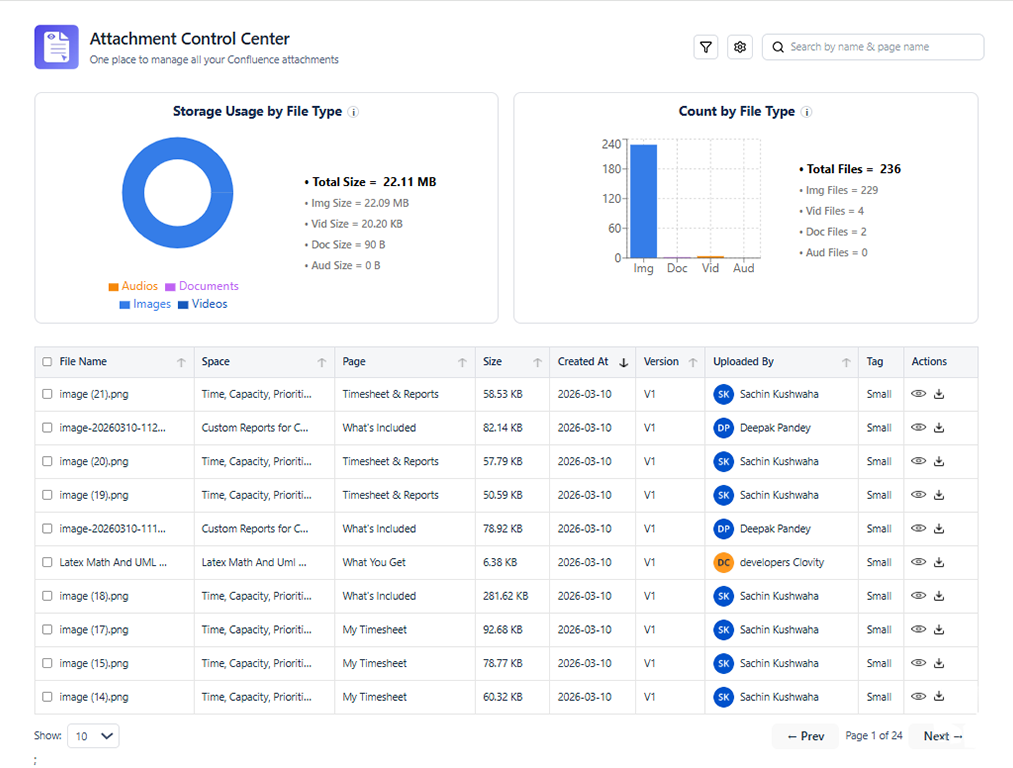
What You See on the Dashboard
The Attachment Center Dashboard is the main overview screen that gives Confluence space administrators an at-a-glance picture of their space's attachment health.
Dashboard Metrics
| Metric | Description |
|---|---|
| Total Attachments | Count of all attachments uploaded to the space |
| Total Storage Used | Aggregate size of all attachments in MB/GB |
| Orphaned Attachments | Attachments not referenced in any page content |
| Large Files | Attachments exceeding the configured size threshold |
| Attachments This Month | Number of new uploads in the current calendar month |
Storage Health Indicator
The storage health bar at the top of the dashboard provides a visual representation:
- Green: Storage usage is below 75% of the configured warning threshold
- Yellow: Storage usage is between 75% and 100% of the warning threshold
- Red: Storage usage has exceeded the warning threshold - action recommended
To configure the warning threshold, go to Space Settings → Content Formatting Macros → Attachment Center → Storage warning threshold.
Quick Action Cards
The dashboard surface displays three quick action cards:
- Review Orphaned Files - Opens the attachment list pre-filtered to show only orphaned attachments
- Find Large Files - Opens the attachment list sorted by file size (largest first)
- Recent Uploads - Shows attachments uploaded in the last 7 days
Attachment Activity Chart
The activity chart plots attachment uploads over the selected time period (7 days, 30 days, or 90 days). Use it to:
- Identify spikes in upload activity
- Spot the dates when large batches of files were uploaded
- Understand storage growth trends over time
Navigating from the Dashboard
- Click any metric card to go to the attachment list filtered by that metric
- Click View All Attachments to see the unfiltered list
- Click Audit Log to switch to the audit trail view
- Use the Space Picker (top right) to switch between spaces if you have admin access to multiple spaces