Advanced Content Navigation (Tabs)
Tab Parent Content Mapper
Tab Parent Content Mapper Guide
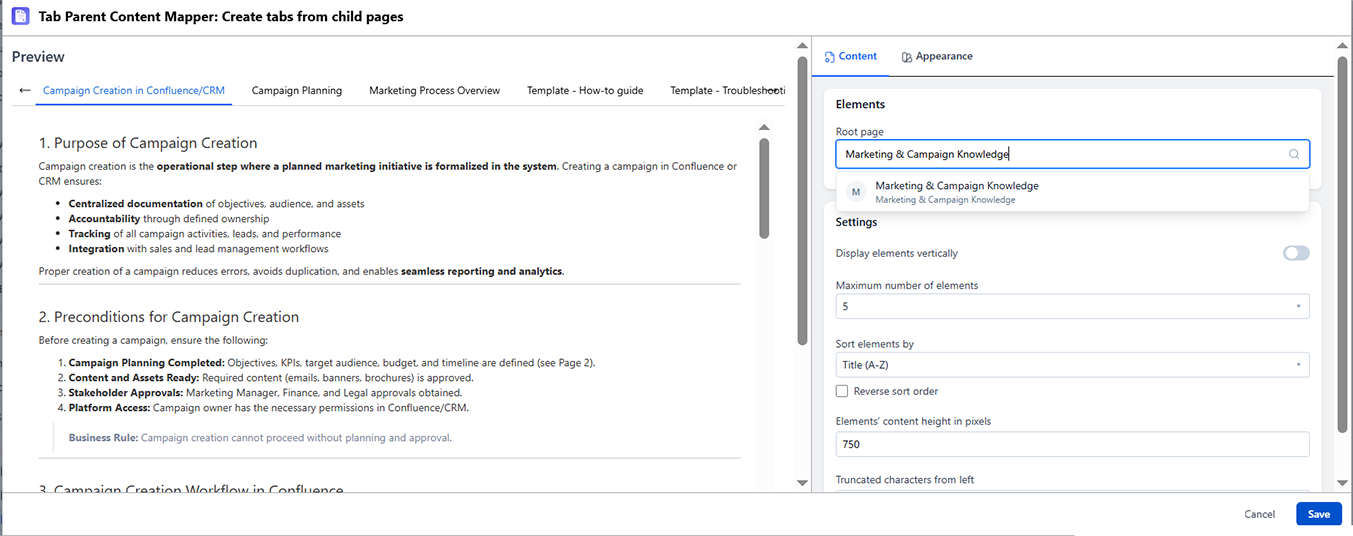
What It Does
The Tab Parent Content Mapper creates one tab for each child page of a specified Confluence parent page. When child pages are added, renamed, or removed, the tabs reflect those changes - no manual editing of the hub page required.
When to Use It
- You already have (or plan to create) separate child pages for each topic
- You want tabs to stay in sync with your page hierarchy automatically
- Teams maintain individual pages and a hub page should aggregate them as tabs
How to Set It Up
- Insert Tab Parent Content Mapper directly on the page
- In the config panel, set the Parent Page - either the current page or another page in the space
- Choose sort order and any filtering options
- Preview and publish
Settings Reference
| Setting | Description | Default |
|---|---|---|
| Parent Page | The page whose children become tabs. You can type a page name. | Current page |
| Sort Order | Alphabetical, Created Date, Modified Date | Manual (page tree order) |
| Max Tabs | Maximum number of child pages to show as tabs | All |
Important Behaviors
- Access control respected: If a viewer doesn't have read access to a child page, that tab does not appear for them
- Draft pages are excluded: Only published child pages appear as tabs