Custom Tabular Report
Paragraph View
Paragraph view converts each Confluence content item into a readable text block - prose-style output instead of a table. It is ideal for narrative summaries, weekly digests, executive reports, and any context where readable text matters more than structured data.
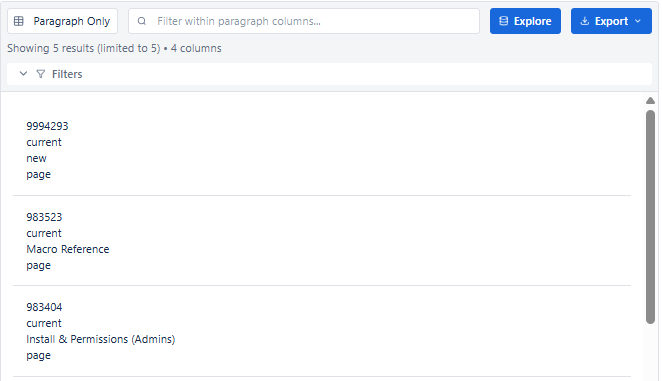
Key Features
| Feature | Description |
|---|---|
| Prose output | Each record becomes a readable paragraph, not a table row |
| Column concatenation | Column values are joined together to form sentences |
| Prefix & Suffix (Text block) | Add connecting words before/after field values to build natural sentences |
| Fallback values | Show a default text when a field is empty |
| No pagination | All records rendered sequentially as continuous text |
| Inline search | Filter visible paragraphs by keyword |
When to Use Paragraph View
- Weekly content digest - narrative summary of recent created/updated pages
- Executive summaries - readable output for non-technical stakeholders
- Newsletter-style reporting - blog posts or announcements in prose format
- Change log summaries - each update described in a sentence
- Anywhere a table feels too technical - Paragraph makes data human-readable
How to Build Readable Sentences
Use the Text block type with Prefix and Suffix settings to construct natural-language sentences from field values.
| Column | Block Type | Prefix | Source Field | Suffix | Result |
|---|---|---|---|---|---|
| 1 | Link | - | title → _links.webui | - | Clickable page title |
| 2 | Text | was last updated by | version.by.displayName | - | ...was last updated by John |
| 3 | Text | on | version.when | . | ...on 12 Feb 2026. |
Configuring Paragraph View
- Set Report Type to Paragraph in the header dropdown.
- Load required expansions in the left panel.
- Open the Columns tab - add columns in the order they should appear in the sentence.
- Use Text block type - set Prefix and Suffix to add connective words.
- Set fallback values on Text blocks so empty fields show meaningful defaults.
- Apply filters and set Result Limit.
- Review in Live Preview - read the output as a human would.
- Save to your Confluence page.
Best for: Weekly digests, executive summaries, newsletter-style reports, change logs - any audience that prefers reading over scanning a data table.