Custom Tabular Report
Templates
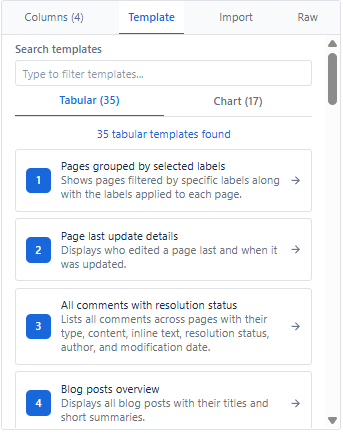
Pre-built templates provide ready-to-use report configurations for common use cases. Templates save time and ensure consistent reporting patterns. All 35 templates are listed below in order.
How to Apply a Template
- Open the macro editor on any Confluence page.
- Navigate to the Templates tab in the right panel.
- Search by name or browse the list.
- Click a template - it auto-configures the entire report.
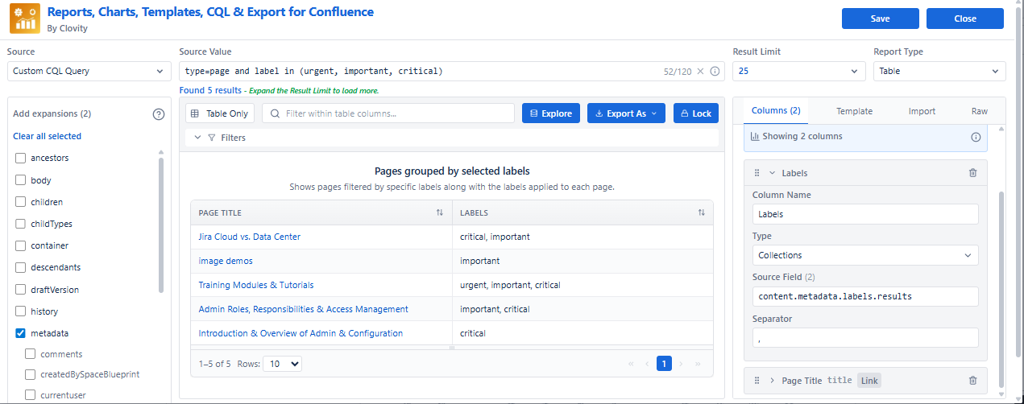
- Review results in Live Preview.
- Customize columns or filters if needed.
- Click Save to publish to your Confluence page.
Available Pre-built Templates
| # | Template Name | What It Shows | Objective | Best For |
|---|---|---|---|---|
| 1 | Pages grouped by selected labels | Pages filtered by chosen labels, showing page title + labels list | Quickly find and review all pages tagged with important labels | Governance for 'urgent/critical' pages, label cleanup, topic-based content tracking |
| 2 | Page last update details | Each page with last editor and last edited date | Track ownership and most recent activity per page | Audit 'who changed what', stale content review, accountability reporting |
| 3 | All comments with resolution status | Comments (inline + normal) with resolution status, author, modified date, excerpt | Track discussion items and unresolved feedback across Confluence | Review unresolved inline comments, discussion follow-ups, moderation/audit |
| 4 | Blog posts overview | Table of blog posts with title + excerpt/summary | Quick overview of announcements/news posts | Company news digest, blog library, communications tracking |
| 5 | Pages matching title keyword | Pages whose title contains a keyword (e.g., 'project') | Discover related pages without knowing exact names | Find 'Release Notes', 'Project', 'Design', 'Meeting Notes' pages fast |
| 6 | Recently updated content across spaces | Latest modified pages/blogs across all spaces with space + last modified | Monitor recent activity globally | Weekly admin audit, adoption tracking, activity dashboards |
| 7 | Content created by me | All pages/blogs/comments created by current user with type, contributors, excerpt | Personal contribution inventory | Performance reporting, personal dashboard, self-audit of work |
| 8 | Pages updated this year | Pages modified after start of year + contributors | Measure this year's documentation activity | Annual reporting, review top active areas, contributor visibility |
| 9 | Pages authored by me | Only pages created by current user, sorted by last modified + title | Personal page library and maintenance list | Clean up old pages you own, maintain your content set |
| 10 | Page likes in current space | Pages in current space with like count | Identify popular/high-value pages | Highlight best docs, measure engagement, identify key references |
| 11 | Attachments and images in current space | Attachments list with file name, parent page, file size, image preview | Audit attachments usage and storage | Storage cleanup, find large files, media inventory |
| 12 | My recently updated pages | Pages last modified by current user with updated time | Track your latest edits | Daily/weekly work recap, 'what did I touch recently' |
| 13 | Child pages with contributors and last editor | Child pages under current page with last editor, last modified, contributors | Manage a page tree with clear ownership/activity | Documentation hub maintenance, section owners, navigation governance |
| 14 | Recently updated pages across all spaces | Pages sorted by last modified with space + friendly update time | Global page activity feed | Admin monitoring, knowledge base activity reporting |
| 15 | Pages created in last 3 months | Pages created in last 12 weeks + last modified | Identify new content for review | Onboarding content review, new documentation QA, growth tracking |
| 16 | Pages created this year | Pages created since start of year with created date | Measure content growth (new pages) | Annual documentation growth metrics, team output reporting |
| 17 | Page creation vs last update timeline | Pages with both created date and latest update date | Understand lifecycle - fresh vs long-lived pages | Staleness analysis, maintenance planning, governance insights |
| 18 | Pages by space and creator | Pages with space + original creator | Ownership tracking across spaces | Identify responsible teams/users, transfer ownership, audits |
| 19 | Labels used in current space | Pages in current space + their labels | Label governance and taxonomy review | Standardize labels, remove duplicates, find untagged content |
| 20 | Child pages of the current page | Child pages list with excerpt | Create quick index/summary of a section | Documentation landing pages, structured navigation, hub pages |
| 21 | Recently created pages | Pages sorted by creation date (newest first) + created date | Spotlight newly created documentation | New content review queue, onboarding 'what's new' |
| 22 | Pages Updated By a Specific User | Pages with last updated by + last updated date (version fields) | Track updates by a user (or team) for accountability | Reviewer workflow, contributor reports, audit trail |
| 23 | Attachments Overview with Metadata | Table report of attachments with key metadata | Audit and manage files easily | Clean storage, find large/old files, track uploads |
| 24 | Stale Pages – Detailed View | Pages not modified in 40+ days with space info, created/creator, last modified/modifier, page link | Full stale-content audit with enough fields to take action | Cleanup campaigns, compliance reviews, maintenance scheduling |
| 25 | Content Created in Date Range | Content with type + created date + author | Report content created within a defined period | Monthly/quarterly reporting, content production tracking |
| 26 | Attachments Coverage Summary | Pages with attachment counts and attachment paging metadata + link | Understand attachment coverage per page | Identify pages with heavy attachments, storage governance |
| 27 | Owner vs Last Editor | Pages showing creator (owner) vs last updater + last updated time | Compare ownership vs active editors | Ownership reassignment, accountability checks, audit reporting |
| 28 | Pages – IDs & ARIs | Pages with content ID, ARI, base64 ARI, type | Provide internal identifiers for integrations/debugging | API troubleshooting, migration scripts, support diagnostics |
| 29 | Space & Page Status Audit | Pages with space type/status + page status + page link | Governance view for cleanup and standardization | Space lifecycle audits, ensure pages/spaces are 'current', compliance |
| 30 | Pages – Link Formats Overview | Shows API link, standard web link, and short link for pages | Help users choose correct link format for sharing/integration | Documentation linking standards, automation/webhook references |
| 31 | Blog Posts – Older than 30 Days | Blog posts created >30 days ago with space + last updated | Review older blogs for archival/cleanup | Content hygiene, outdated announcements review |
| 32 | Content – Everything Except Pages | All content items where type != page (blogs, attachments, comments, etc.) | Audit non-page content across instance | Storage cleanup, attachment audits, content-type governance |
| 33 | Blog Posts – Updated This Year | Blog posts modified since start of year with last updated + space key | Track active blog/news activity this year | Communications KPI, yearly reporting, stakeholder updates |
| 34 | Weekly Updated Pages | Pages updated in last 7 days with space + last updated + excerpt | Weekly activity snapshot | Weekly digest, team status reporting, 'what changed' |
| 35 | Today Updated Pages | Pages updated in last 24 hours with space + last updated + excerpt | Daily change tracker | Daily standups, release/change monitoring, fast review queue |
Template Benefits
| Benefit | What It Means |
|---|---|
| Quick start | Ready-to-use configurations - zero manual setup needed |
| Best practices | Proven report structures for the most common use cases |
| Consistency | Standardized reporting patterns across teams and spaces |
| Customizable | Use as a starting point - add, remove, or reorder columns freely after applying |
| Unlockable | Templates are locked by default - click Edit in the center panel to modify |
Tip: After applying a template, click the Edit button in the center panel to unlock it - then customize columns, filters, or data source to fit your exact needs.