Data Source
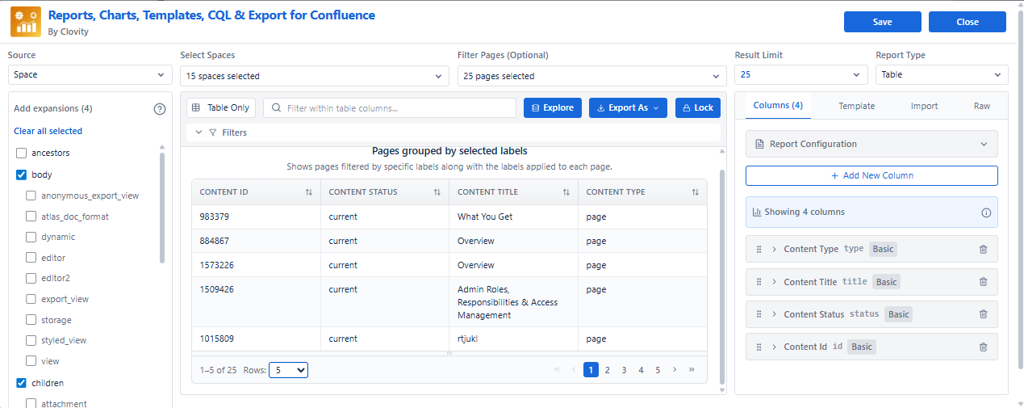
Reports, Charts, Templates, CQL & Export for Confluence supports two ways to fetch Confluence content. Select from the Data Source dropdown in the macro editor header.
Option A - Spaces (Drill-down)
Best for browse-based, simple reporting. No syntax required - ideal for non-technical users.
Capabilities
- Select one or more Spaces - choose from all available Confluence spaces
- Select specific Pages - drill down to individual pages within selected spaces
- Multi-select - select multiple spaces and pages simultaneously
- Include Children - automatically includes all child/descendant pages under selected pages
- Visual navigation - browse through space hierarchy like a file explorer
- Search functionality - find spaces and pages by name quickly
Limits
| Limit | Value | Reason |
|---|---|---|
| Space Selection Limit | Up to 15 spaces | Ensures optimal system performance |
| Page Selection Limit | Up to 25 pages | Maintains report performance |
When to Use Spaces
-
Simple, straightforward reporting on known spaces
-
Non-technical users who prefer visual selection over queries
-
Selecting content from specific pages or documentation sections
-
Quick setup without writing queries
-
Content selection based on space organization
Option B - Custom CQL
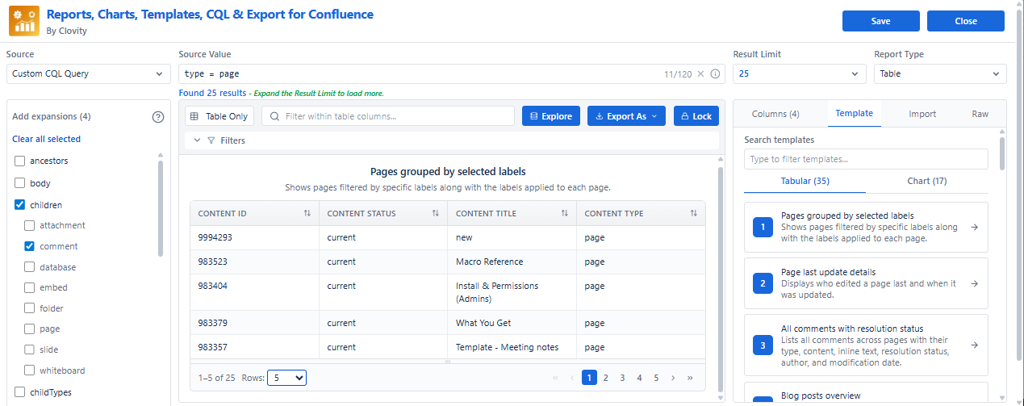
Confluence Query Language (CQL) gives you precise, rules-based control. Best for dynamic queries that update automatically as content changes.
What CQL Can Target
- Space and content type
- Labels, creator, last modifier
- Title keyword matching
- Created and updated date windows
- Multiple combined criteria
Example CQL Queries
Recently updated (last 30 days): type = page AND lastmodified >= now("-30d")
Title contains keyword: type = page AND title ~ "Release Notes"
Pages in a specific space: space = "ENG" AND type = page
Pages with a label: label = "decision" AND type = page
When to Use CQL
- Dynamic, rules-based selection that updates automatically
- Filtering by metadata - labels, dates, creators, status
- Complex criteria spanning multiple spaces
- Automated reports that grow with new content
- Users familiar with CQL syntax
Side-by-Side Comparison
| Feature | Spaces (Drill-down) | Custom CQL |
|---|---|---|
| Ease of use | Visual, no syntax required | Requires CQL knowledge |
| Dynamic updates | Fixed selection | Fully dynamic |
| Cross-space queries | Up to 15 spaces | Unlimited |
| Child page inclusion | Include Children toggle | Use CQL descendants() |
| Technical level | Non-technical users | Technical users |
| Best for | Quick, targeted reports | Complex, automated reports |