Features
Live Preview
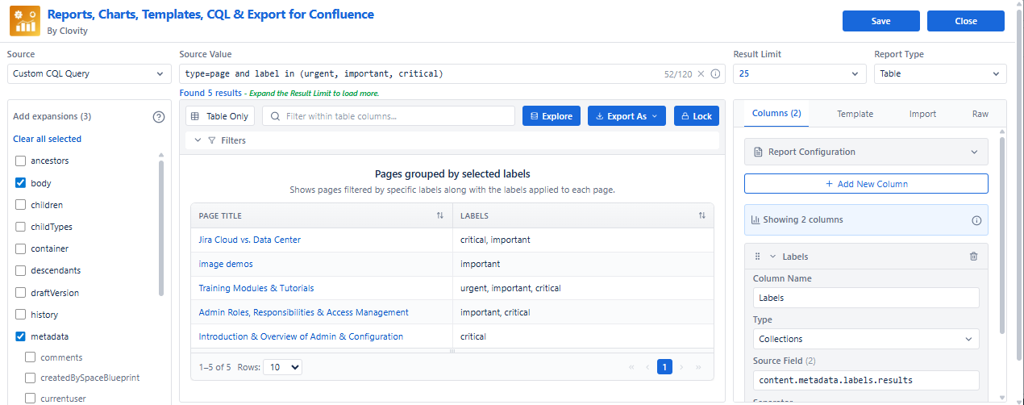
Live Preview allows you to see report results instantly as you configure your report. The preview updates in real-time without needing to save or refresh the page.
Overview
Live Preview is the center panel of the macro editor. Every change you make - data source, expansions, columns, filters, or view type - is reflected in the preview immediately. This lets you validate your configuration before saving.
When Live Preview Updates
Data Source Changes
- Switch between Spaces drill-down and Custom CQL
- Modify space or page selections
- Update CQL queries
Expansion Changes
- Add or remove expansion groups
- Load additional metadata fields
Column Changes
- Create new columns
- Edit existing column configurations
- Drag and drop to reorder columns
- Change date formats, text transformations (uppercase/lowercase)
- Set truncation, prefix, suffix, or fallback values
Filter Changes
- Add global filters
- Modify filter criteria (operator, property, value)
- Remove filters
View & Template Changes
- Change between Table, List, Grid, Paragraph, or Charts
- Select and apply templates from the Templates tab
- Paste JSON recipes in the Import tab
Benefits of Live Preview
| Benefit | What It Means |
|---|---|
| Immediate feedback | See changes without saving - no page reload needed |
| Faster configuration | Test settings in real-time and adjust instantly |
| Error detection | Identify issues (blank columns, wrong filters) before finalizing |
| Safe experimentation | Try different configurations without affecting the published report |
Tip: Check Live Preview frequently as you build - after adding each column and each filter. This catches issues early before they compound.