Features
Templates & Import/Export
Use pre-built templates for instant setup, or share report configurations as JSON recipes across your team.
Pre-built Templates Overview
Reports, Charts, Templates, CQL & Export for Confluence includes 35 tabular templates and 17 chart templates - ready-to-use configurations for the most common reporting scenarios. Templates save time and ensure consistent reporting patterns.
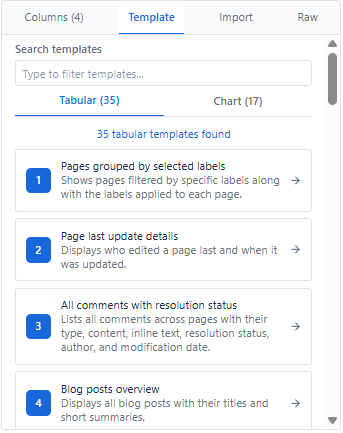
How to Use Templates
- Open the macro editor.
- Navigate to the Templates tab in the right panel.
- Search or browse to find a template.
- Select a template - it auto-configures source, expansions, columns, filters, and view.
- Customize as needed.
- Review in Live Preview.
- Save to your Confluence page.
Benefits
- Quick start - ready-to-use configurations with zero setup
- Best practices - proven report structures for common use cases
- Consistency - standardized reporting across teams
- Customizable - use as starting points and modify as needed
Import - Recreate from JSON Recipe
Use Import to recreate any report from a JSON configuration recipe - instantly rebuilds the full setup including source, expansions, columns, filters, and view.
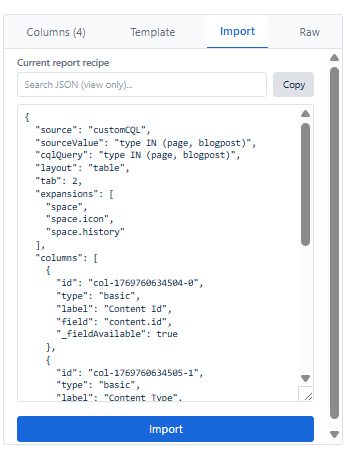
How to Import
- Navigate to the Import tab in the right panel.
- Paste the JSON recipe into the text area.
- The app automatically rebuilds the entire report configuration.
- Review in Live Preview and save.
Recommended for
- Standardizing reports across spaces
- Sharing configurations across teams
- Quickly replicating dashboards on multiple pages
Export Options
| Export Type | Format | How to Access | What's Included |
|---|---|---|---|
| Report Data | CSV | Center panel Export button (Table view) | All visible columns and filtered data |
| Report Data | JSON | Center panel Export button (all views) | Full data structure from Confluence |
| Report Config | JSON Recipe | Copy JSON button in Import tab | Full configuration to recreate the report |
Tip: Store JSON recipes on a shared Confluence 'Report Library' page - document each recipe's purpose and use case so your team can find and reuse them.